
Ecliptomaniacs
Welcome to ecliptomaniacs.com - the website of the Irish eclipse lunaire chasers. Please click on the buttons to the left or the links below to find out more!
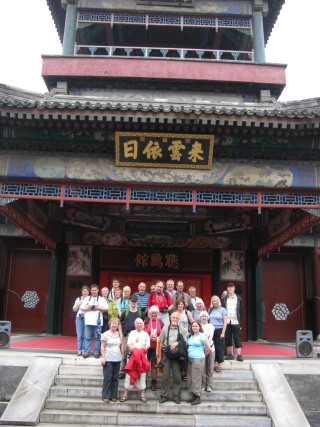 The group of Irish, Swedish and English eclipse chasers in China for the 22 July 2009 eclipse which we
jokingly called Operation Dim Sun. Unfortunately they were totally clouded out along with millions of others
along the track in China. A report on the Chinese trip will be added on their return when we have a look at the
photos of the overall trip.
The group of Irish, Swedish and English eclipse chasers in China for the 22 July 2009 eclipse which we
jokingly called Operation Dim Sun. Unfortunately they were totally clouded out along with millions of others
along the track in China. A report on the Chinese trip will be added on their return when we have a look at the
photos of the overall trip.
About Us - a brief history of the Ecliptomaniacs
In 1999 a group of 60 Irish people travelled to Shabla in Bulgaria to view their first total solar eclipse. Little did some of them know at the time that this visit would change their lives for good. A core group of twelve went on to become dedicated eclipse chasers or umbraphiles as some prefer to be called. However the South Africans called us Ecliptomaniacs and this amusing insight into our passion has become my preferred term for what we do, a compulsion to travel the world and "steal" brief glimpses of one of nature's great spectacles for that is what a solar eclipse indeed is.
In 1999 I was on the committee of the local astronomy club and at a meeting one evening the question was asked as to who would like to organise a trip to view the eclipse that August. I remember looking around the people present and was surprised to see that my arm was the only one raised. So in the deep end I went and set about organising a trip which ended bringing 60 people to view their first total solar eclipse. So much organising went into that trip that I had no time myself to even consider what the eclipse was going to mean to me personally. I never really got time to think about it.
It was only twenty minutes or so before totality on Aug.11th that I managed to get some time to myself and realise that I was about to see a spectacular natural event. I prepared myself as best I could by going for a short walk and getting away from the crowds on the beach.
Once the great event had occurred I was hooked! I recall turning around and asking Chris "When is the next one, will we organise a trip to that as well?"
And here we are now, with 4 Total Solar Eclipses "under the belt", two annular eclipses (one clouded out) and planning ahead for the next trip!
Brian Seales
The eclipses we have chased so far -
| Date | Place | Latitude | Longitude | Type | Duration |
|---|---|---|---|---|---|
| 1999 Aug 11 | Shabla Beach, Bulgaria | 43° 33.854' N | 28° 35.407' E | Total | 2m 22s |
| 2001 Jun 21 | Morombe, Madagascar | 21° 44.750' S | 43° 21.099' E | Total | 2m 17s |
| 2002 Dec 04 | Folorodwe, South Africa | 22° 27.942' S | 30° 28.538' E | Total | 1m 24s 1 |
| 2003 May 31 | Ackergill, Scotland | 58° 28.483' N | 03° 06.064' W | Annular | 1m 09s 2 |
| 2004 Apr 19 | Bamboo Club, Madagascar | 23° 07.098' S | 43° 36.600' E | Partial | (n/a) |
| 2005 Oct 03 | Polop, Spain | 38° 37.382' N | 00° 08.050' W | Annular | 3m 53s |
| 2006 Mar 29 | Waw an-Namus, Libya | 24° 45.268' N | 18° 11.914' E | Total | 4m 08s |
If you have Google Earth installed on your computer, you can download our waypoints list, which shows where we were during the 1999 to 2005 expeditions. There are further waypoints on the home pages for the other expeditions.
Who are we ?
Those who have travelled on the 6 different eclipse expeditions so far.
Brian Seales is our fearless (?) leader, and gets everyone there and back in one piece.
Chris O'Byrne is the eclipse expert. He makes sure we are in the right place at the right time.
A big thank you to everyone on this list for some wonderful experiences and great fun down through the years.
Bulgaria 1999
Chris O'Byrne, Brian Seales, John Bateson, Liam Staunton, Jim Lynch, Olivia Flynn, Mark Dowling, Jean Kane, Ros O'Shaughnessy, Natalie O'Shaughnessy, Barry Cooke, Mary Gillick, David Laing, Dave Parker, Brendan O'Connor, Isolda O'Connor, David Borland, Eunice Borland, Dan McCarthy, Padraig McCarthy, Terry Hardiman, Stephen Hardiman, John Hardiman, Aubrey Glazier, Mick Murphy, Ray Blake, Colman Fox, Carl Fox, Karen Fox, John Maher, Jerry Hynes, Mary Hynes, Gerry Swan, Paddy Walsh, Paul Moore, Declan Butterly, Eugene Doran, Michael Moroney, Mary Moroney, Roisin Daly, Miriam Crowley, Mel Howes, Tom Sweeney, Margaret Sweeney, Andrew Sweeney, Denis Hogan, Maura Hogan, Mark Flaherty, Philip Geoghan, Michael Geoghan, Sharon Cairney, Liam Hurrell, Brid NiSheigin, John Monaghan, Siobhan Duran and Roger Duran.
Madagascar 2001
Chris O'Byrne, Brian Seales, John Bateson, Liam Staunton, Jim Lynch, Olivia Flynn, Mark Dowling, Jean Kane, Ros O'Shaughnessy, Natalie O'Shaughnessy, Geraldine Keogh, Dave Seales.
19th April 2004 and we were back in Madagascar for a "sharkfin" eclipse at sunset. Morombe, where we went the last time had been devastated by typhoon Gafilo in March and for all intents and purposes needs to be rebuilt from scratch. Our thoughts go out to the people there and the other areas further to the North East devastated by this particularly violent storm. The only good news we heard about this event was the amount of foreign aid which began arriving within 24 hrs of the storm. It seems that the new Madagascar president has attracted the interest of the international community in a big way with aid coming from The EU, USA, Canada, Japan and South Africa to name but a few. The South Africans provided aircraft to get the emergency supplies into the affected areas as quick as possible. Well done to all the countries worldwide who chipped in to help our favorite country.
On this trip we flew into Tulear from Antananarivo and saved ourselves a week long drive. We stayed at the Bamboo Club in Ifaty (surprise,surprise!) and experienced what I can only describe as the loneliest eclipse so far. Only four of us made the trip, myself, John Bateson, Liam Staunton and Mary Rogers. We were on our own for the first week with no guides or translators to help us out but nevertheless we managed perfectly well and had a great time in the excessive heat. It was 32 degrees centigrade in the shade most days and everything we had heard before about Malagasy mossies proved true. They do bite through clothes and are vicious to boot. As usual these days for our eclipse trips it was cloudy at sunset on Monday April 19th after two stunning cloud free green flash sunsets the previous two days. What is it about solar eclipses that they seem to generate cloud or is it just a coincidence. Every other sunset on our 3 week trip was cloud free bar that one really important day.
Anyway we pressed ahead with our preparations. We had two digital cameras and two standard 35mm SLR'S with 500mm lenses along and hoped to capture something on film. I decided to photograph this eclipse, the first time I have ever attempted to do so. This proved a much more difficult task than I had anticipated. With the sun only partially eclipsed at sunset it was for all intents and purposes still shining at full strength. The digital cameras found it difficult to cope with the glare and out of my quick fire roll of 36 exposures through gaps in the cloud I only managed to capture the event properly in four shots.( On my old trusty Praktica would you believe). Ah well you live and you learn. Now I know why I do not bother to photograph total solar eclipses and prefer to to sit back and enjoy them with the naked eye.
Highlights of this trip.
- The eclipse.
- The family of Grey Mouse Lemurs who lived in the roof of our chalet at the Bamboo Club. Where else but Madagascar would you get such neighbours?
- Comet 2001Q4 Neat. Not as bright as predicted but still nice and our constant companion every night of the trip.
- Comet 2002T7 Linear. Equally unspectacular and difficult to view in the early morning sky. Still, viewing two new comets in the space of a week is not bad and probably will not be repeated by me again.
- The riveting boat trip down the Tsiribihina river in the second week and the hospitality of the boat crew.
- Kirindy Forest where the wildlife comes at you with such regularity that it was difficult to keep track of what we were seeing.
- "George" the Fulvous Lemur in Morondava who really did not care for people at all. Just wandered around growling at anyone who bothered him. Good on you George!
- The stunning flight from Morondava back to Antananarivo. Low and slow over the Tsiribihina river which we had traveled down the previous week. Bravo Air Madagascar! I am still smiling at the fact that when I presented my flight ticket at the airport I was presented at the check-in desk with a bottle of Coke and a fish roll for lunch on board the plane. It didn't matter to me if flights were canceled at the last minute and never left on time. Its all part of the experience!
- The Lunar eclipse we watched from the wonderful nature reserve in the mountains at Anjozorobe.
- Antananarivo itself. The city has undergone a dramatic change for the better in the few years since we were last there. Now its a vibrant capital city buzzing with productivity and resourcefulness. Well done Marc Ravalomanana and the Malagasy people.
- Another flight from Antananarivo to Tulear via Tolagnaro. The "handbrake turn" over the sea in a Boeing 737 to make it onto the airfield at Tolagnaro was just astonishing. We actually saw the airfield out the right hand side window and commented "That cannot be our airfield because we have just passed it". Boy were we wrong. The pilot just dipped the right wing, did a stomach churning turn and dropped us down onto the runway in a perfect landing. Then we were all told we could go for a walk and stretch our legs before traveling onto Tulear. We needed the break in the fresh air to recover our composure!
- Last but not least the irreplaceable Hoby, our faithful guide, and her transfer off the boat in the Tsiribihina. It involved a 20min. walk in the midday sun, a small boat trip across a flooded plain, then a transfer to a zebu cart to be brought through a rice paddy and then dropped off beside a modern Toyota Landcruiser. These Malagasy people are just a wonder to behold. They do not have the word "cannot" in their vocabulary. They always manage to get you from A to B safely. We will be back.
South Africa 2002
Chris O'Byrne, Brian Seales, John Bateson, Liam Staunton, Jim Lynch, Olivia Flynn, Mark Dowling, Sinead Cawley, Jean Kane, Ros O'Shaughnessy, Natalie O'Shaughnessy, Geraldine Keogh, Mary Rogers, Laura Seales, Barry Cooke, Mary Gillick, Clodie Johnson, Liz Morris, Eugene Connoly, Colette Connoly, Jacinta Heslin, Mary Molloy, Concepta Gallagher, Anna Dowd.
December 4th 2002 brought us to South Africa, a country with which I always felt a strong affinity due to its strong Irish connections. It was strange driving around the countryside with its Irish place names. I remember the film Zulu as a child and was thrilled to meet these people after all these years. We were treated to a number of Zulu cultural encounters which proved fascinating.
We also had a chance to stay with real Afrikaaners who gave us a great welcome and made us feel totally at home. Many thanks are due to William Raats of Afri Zulu Tours and Frik Le Roux from African Itch for their help in organising this fabulous trip. We are also grateful to Ross Kruger,our driver, who looked after us like we were his own children.
Eclipse day was totally cloudy. We were with a large group of international eclipse chasers at Folorodwe near Tshipise. Right in the middle of the site was a large Baobab tree, an omen perhaps?
Just as we were resigned to missing our first eclipse a magical hole appeared in the clouds and we saw second contact complete with diamond ring and then the corona. We were so shocked that our cameras stayed on their tripods while we danced around like a bunch of fools. Clodie Johnson and Sinead Cawley had the presence of mind to keep their camcorders running and we will post a copy of what they filmed when it is ready. It is the only proof we have that we actually saw the event. One of our South African friends asked me what this eclipse was like compared to the other ones we had seen. I told him that it had been one of the most stressful days of my life.
Such is the effect that eclipses have.
The animals, plants and birds made up for the near miss. Spectacular views of elephants, giraffes, lions, leopards and rhinos soon took our minds off what we had nearly missed. The accomodation was excellent and comfortable, the food top quality if a little too much of it, the people everywhere humurous and helpful. I put food on a bird table in one of the places we stayed and was rewarded by a visit from an Ostrich. That was South Africa, a land of contrasts way beyond our normal European concepts.
Enjoy some of our photos
Highlights.
-
The near eclipse miss at Folorodwe.
-
The leopard in Kruger National Park.
-
The rhino charge at Ithala Game Reserve.
-
The Zulus of Aloe Ridge.
-
The Zulus at Shakaland.
-
Capetown, a truely beautiful city.
-
Two Oceans Aquarium in Cape Town, must be one of the best in the world.
-
The so called "Wild Bar" at our hotel in Cape Town which was anything but.
-
The helicopter flip over Cape Town.
-
Table Mountain.
-
The Graskop Hotel in Graskop for its wonderful welcome and hospitality.
Scotland 2003
Chris O'Byrne, Brian Seales, John Bateson, Liam Staunton, Jim Lynch, Olivia Flynn, Mark Dowling, Sinead Cawley, Jean Kane, Dave Seales, Grainne Dunne, David Laing, Clodie Johnson, Liz Morris and Mary Rogers.
"The next eclipse, an annular one, occurs in the early morning of 31st May 2003. We will be in Scotland - in Durness, if weather permits. We will be staying by the shores of Loch Ness, and we will have our own transport to get us to whatever eclipse site is forecast to be clear."
This is what we wrote before we left for Scotland. Note the bit that says "if the weather permits". Hah! Little did we know that the weather was not going to permit even a glimpse of the partial stages. Why do we put ourselves through such grueling drives to get a glimpse of the moon crossing the face of the sun? There were a number of points about the failure of this chase which brought home to me the reason why our hobby is so addictive. Its all about the people who travel with us.
I knew that this could be a really beautiful annular eclipse with the sun rising out of the sea with the moon already covering it. My disappointment at the weather conditions were soon put to one side by the spontaneous humour which was shared by us all as we stood on that little pier at Ackergill. Dave Seales christened the occasion "The Wee Dimmin". There is nothing I can add to that because that phrase perfectly describes all that we saw. Someone else commented that the seabirds did not even interrupt their breakfast.
Another comment was "Are you sure we are looking in the right direction?", at which point we laughed but then one by one looked over our shoulders just to be sure. A group of local astronomers sat in their chairs with all their cameras ready, only to give up and switch on their lap top, pour a few glasses of wine and proceed to admire the eclipse courtesy of Starry Night Pro."This is a much better view", " It looks great over Stockholm" and on and on the comments went. I also must pay great compliments to Chris O'Byrne who guided our two mini buses along the foggy roads in total darkness with his GPS to this remote little harbour in North East Scotland. The shame of it all is that it was a truly beautiful site to have witnessed such an event. Ackergill has lost its place in history, for the present anyway. Liam Staunton stepped out from behind his normal photographic duties to do some brilliant driving in atrocious conditions. Dave Seales did what all great brothers do and took over at the wheel from Brian who had eventually succumbed to the sheer exhaustion of, well, everything.
View some of our photos.
Highlights.
1.Great breakfast at the Loch Ness Lodge Hotel after arriving back at 8.30am from our night long search.
-
Mark(Dowling) and the Muffins with his hit song "Foggy Beach". Yes we still had a fit of giggles at the same breakfast despite the tiredness.
-
Drumnadrochit and it's Nessie exhibitions.
-
The Fiddlers in Drumnadrochit. A great restaurant run by wonderful obliging people.
-
John Bateson's surprised face when his Loch Ness Monster shaped "birthday cake" was produced on Saturday evening 31st May. It was John's birthday on eclipse day so it was a shame we saw nothing.
-
Loch Ness is a weird lake. I do plenty of lake fishing here in Ireland but this lake is different, somehow. I can't quite put my finger on it. Every photo I took of the lake later showed something that I do not recall being there at the time the photo was taken.
-
Fort Augustus. A beautiful picturesque town at the far end of Loch Ness. Great name!
-
Glencoe. Spectacular scenery in one of the most famous and historically notorious beauty spots.
-
The Commando Memorial. High in the mountains this bronze memorial erected in the area where these special soldiers were raised as a unit, and then trained during WW2, is a fitting tribute to them. It is a stunning piece of work, you felt like they were going to come to life all over again. I kept thinking of the Bronze statue that came to life in the film Jason and the Argonauts!
-
Urquhart Castle. A bit too touristy for my liking but hey what a great place to build a castle in the first place.
Spain 2005 annular solar eclipse trip
Chris O'Byrne, Brian Seales, John Bateson, Jim Lynch and Olivia Flynn.
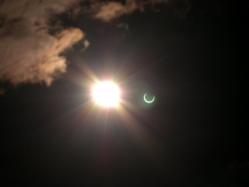
Going to Spain, there was just one question on my mind - were we going to experience our first successful annular eclipse? We missed seeing the annular in Scotland in 2003 due to fog, and so we were anxious to experience success this time. So, we booked a holiday apartment (Tigín - Irish for "small house") and rental car, and headed to Spain.
We arrived in La Zenia, south of Torrevieja, fairly late at night - we got lost, and had to get directions. Our first day in Spain - the day before the eclipse - had totally clear skies, so we decided that a scouting trip up the coast probably wasn't necessary. However, that evening brought frantic Internet research about what the weather might do, and we learned that there was an area of low pressure in the Mediterranean Sea that was generating cloud.
Eclipse day dawned cloudy. So we bundled into the car and headed up the coast. We missed first contact (the start of the partial eclipse) - at the time, we were on the road trying to get ahead of a large bank of cloud. Shortly, however, we began to see the proverbial "light at the end of the tunnel" - a patch of blue sky ahead of us. We stopped at a petrol station, for some rest, and found ourselves in glorious partially-eclipsed sunlight. Since it was as good as any other place to be, we decided to set up shop, and observe from the carpark. This was going to be an eclipse of unusual observing sites!
However, it soon clouded over, and we saw that the clouds were moving in such a way that it was unlikely that they were going to clear before third contact. So, with less than half an hour to go, we bundled into the car again and headed in the direction of blue sky. We soon found ourselves in a delightful little town called Polop.
We scooted around Polop looking for a parking space, which we soon found on a very quiet side street called Carrer de L'era, beside a workshop of some description. There were very few people around, and essentially no traffic. So there we were, with an array of telescopes and cameras pointing at the sun, waiting for the main event.
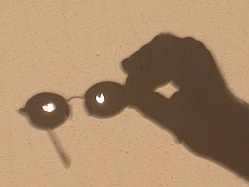
The annular phase of the eclipse lasted just under 4 minutes. It was noticably darker, and quite a bit noticably cooler, during the eclipse. However, the clouds cooperated, and we had a good view of the event. Not long after 3rd contact (the end of the annular eclipse, when the partial eclipse re-starts), we noticed that shadows had an unusual appearance. This was the trigger for some of our funnier photographs. We bundled back into the car before 4th contact (the end of the partial eclipse), as we wanted to meet ecliptomaniacs Barry Cooke and Mary Gillick for lunch in Denia. However, just before 4th contact, we pulled in to the side of the road to see the end of another great eclipse.
Highlights of this trip.
- The eclipse.
- Metting Barry and Mary in Denia - having gone on other trips with them, something would have been missing from this one if we hadn't managed to meet up
- Tigín - it was great to have our own base, and this was quite a comfortable one, with a great outdoor communal pool.
- The church by the castle at Novelda - Brian, John, Olivia and I took a day trip to see this wonderful church.
- The Beach - Olivia and I made good friends with the Mediterranean Sea.
- The weather - only two days with any cloud (eclipse day, and the day that most of us left), and this just after the weather in Ireland turned for the winter.
- 7-year-old Jamacian rum. Need we say more?
Libya 2006
Chris O'Byrne, Brian Seales, Liam Staunton, Jim Lynch, Olivia Flynn, Mark Dowling, Sinead Cawley, Jean Kane, Dave Seales, Barry Cooke, Geraldine Keogh, Mary Rogers, Mike Foy, Pauline Foy, Tora Greve, Erik Johansson, Gote Flodqvist, Gote Pettersen, Carl Palm, Bengt-Erik Wingren, Hans Kronkvist, Willem Joosten, Johannes Joosten, Kurt Von Morgen and Johanna Joosten.
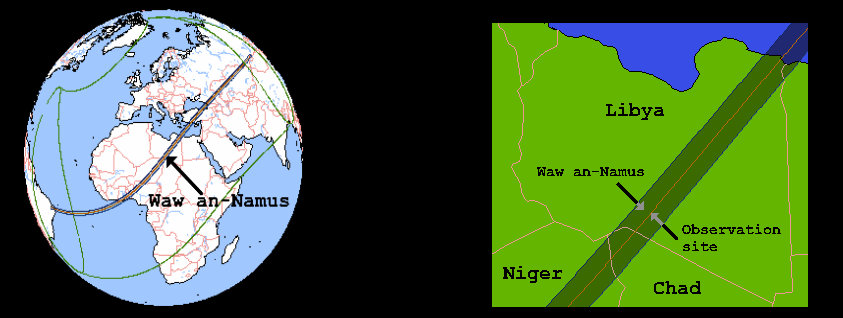
Well this took the longest of any of our trips to plan but was worth it 100%. From the time we set foot in Libya no one even asked me about the weather prospects for eclipse day! Clear skies from the moment we arrived , apart from some fog in the coastal areas, were the trademark of the days leading up to 29th March. The drive on the first day by coach to the edge of the desert passed off without incident and in relative comfort considering the amount of miles we ate up on the main road south.
Our first glimpse of a sand dune led to a frenzied rush to climb it and be photographed on it. In hindsight this scramble must have looked hilarious to our Libyan guides for this sand dune was a "baby". We were to drive up dunes 10 times the height of this one later in the trip.
On arrival at the edge of the desert we changed to 4WD's, a total of 27, and headed south towards Waw an Namus. What fun this was! Fast and furious driving through clouds of dust and sand. Stopping wherever there was shade for lunch, a magnificent salad was laid out for us each day. We realised early on that we were not going to be allowed to starve to death on this trip. One of my most abiding memories of this drive south was seeing European Swallows migrating north across the Sahara. It was a stunning sight to see single birds fly low across the sand, circle around us a couple of times to check us out and then continue their long lonely flight north. Incredible to think that I would be seeing maybe the same birds a few weeks later in Ireland as they prepared to mate and nest for the summer.
Eclipse day brought more clear blue skies with not even a hint of cloud. An hour and halfs drive brought us right onto the centre line with only one other group of eclipse chasers on the horizon towards the north. Were we the furthest group south? It certainly looked and felt like that. Where we stopped there were no more tracks beyond us, just a vast empty expanse of desert.
Before Totality an impromptu soccer match began between our Libyan support team and some of the fitter eclipse chasers. It ended in a suitable and diplomatic 2-2 draw. We never had such enjoyable pre eclipse entertainment before. During totality our drivers said a special Muslim eclipse prayer, Salat al-kusoof, which also added greatly to the overall experience. Totality was followed by singing and dancing which everyone joined in with. A proper eclipse party! We just knew we were going to have fun on the remainder of this trip.
Many thanks to Craig Baguley of Caravanserai Tours and Jamal Fteis of Arkno Tours. Ali, Fawzi, Nasser and Talal, our guides, were wonderful with their patience and good humour in dealing with such a large and diverse group of eclipse chasers from all round the world. A great debt of gratitude is owed to all the support team. From repairing Landcruisers overnight ( A new piston fitted in one case) to the amazing food they produced each day, these guys worked very hard to make our trip a memorable one. Enjoy some of our pictures of the trip. And, if you have Google Earth installed on you computer, you can download our 2006 waypoints and see where we were!
Highlights of this trip.
- The Sahara.
- The eclipse.
- The people of Libya.
- The Murzuq Sand Sea.
- The Acacus Mountains with their stunning landscapes.
- The Oases in the Ubari Sand Sea
- Leptis Magna
- Villa Celine
- Sabratha
- Rallying through the desert in a 4WD. Really great fun and highly recommended!
Why "chase" eclipses?
Total solar eclipses have proven to be very emotional experiences. It is not uncommon for people to be reduced to tears, even those seeing it for the first time. I have no idea why this should happen and I guess we will just have to keep bringing new people along on each eclipse trip to enable us to study this phenomonen. It has been reported from many other eclipse groups as well so it is not just something unique to the Irish!
These trips bring us to places we might not normally consider traveling to for a holiday. Bulgaria in 1999 was a relatively easy country to travel to and meant we could bring a large group of 60 people. However in the second week of the trip we experienced the earthquake which cost such a grave loss of life in Turkey. We even managed to travel to Cairo and visit the Museum and the Pyramids.
Madagascar was a different matter. Difficult travel over non existent roads in 4x4's meant only a small group of 12 could travel. The country was astonishing in its beauty, both landscape and people leaving an indelible mark on us all. Seeing the Indri, the largest lemur in the world and hearing its eerie call travel through the rainforest was an experience we will never forget. As I pointed out to the group, less people have seen and heard the Indri than have seen total solar eclipses, so it was a genuinely rare event to witness.
South Africa with all its game parks was stunning. We even managed to see a Leopard in daytime on our first drive in Kruger National Park. Some South Africans pointed out to us that even though they have spent all their lives in the country they have never seen a Leopard in the wild. One of the group commented that the Leopard experience lasted longer than all the eclipses we had seen to date. To top it all off some of the group were charged by a Black Rhino when on a game walk and it was only stopped by one of the wardens firing a shot in the air when the rhino was only 30 metres away.
Our next total solar eclipse trip brought us to Libya. In 1999 I had stood on the edge of the Sahara and promised myself that I would return some day and drive through the Sahara. The eclipse of March 2006 offered the perfect chance of fulfilling that dream.
Libya was spectacular.
Quite simply, it took our breath away. For the first time the eclipse was totally ( no pun intended ) overshadowed (no pun intended here either! ) by the country. I have only one piece of advice to give to everyone about Libya, and that is, go now , before it changes. An absolutely unique experience. No mobile phones, no internet, barely enough water each day, eating goats and camels............ and absolute solitude, oh and only 3 hours flight from Heathrow! Once you arrive in Libya and head a few hours south, a minutes walk in any direction and you were on your own. A big, big shock to us all. So close to mainland Europe and yet so remote.
It is important when choosing where to watch an eclipse that the country we travel to has something else to offer In each of the four trips so far we have learned a lot about each of the countries we traveled to and have made friends whom we try to stay in touch with. This is one of the great side effects of viewing eclipses. The friends we make have all shared the unique eclipse experience with us and a bond has developed among people who might not normally either meet each other or indeed cross paths in their normal day-to-day lives.
Also in Libya it was the first time we all used digital cameras to any great extent. The hundreds of excellent photos we all brought back are a great example of the current digital revolution. Without the worry of the developing costs or relying on someone else to process your photos, everyone just took photos, just like they were free for the first time ever. I hope the resulting selection of photos is pleasing as we have tried our best to portray our memories of this eventful trip.
Also for the first time the Ecliptomaniacs went international ( or at least European! ) We had, what can only be described as, a very resilient group of Dutch, English and Swedish eclipse chasers. Personally I was humbled by the fact that these much more experienced eclipse chasers chose to join us. I thank them all for their companionship.
As for the actual eclipse memories themselves, well I think the following sums it all up so far.
In Bulgaria there was an elderly cleaning lady in our hotel who was seeing a total eclipse for the third time in her life, from the same place in her own country and it did not cost her a penny! She was not in the least bit excited about it.
In Madagascar the locals hid from the eclipse, thinking that it would bring them ill fortune.
In South Africa everyone watched.
In Libya there was a special prayer, the Salat al-kusoof, which is only recited during a total solar eclipse. It thanks God/Allah for the beauty of the eclipse. It did not matter whether we were Muslim or Christian or whatever. We all shared this wonderful natural event together.
BRIAN SEALES